Everything, in one place
Features
What InOrOff does today, grouped by the people who use it. Every item below is built, tested and live; what is not yet built is listed at the end.
For employees
Three actions, on a page that says what is expected today and what has been recorded.
- Check in and check out
- From their own browser. The server stamps the time; the device clock is never trusted. Office-network rules, if you use them, apply to both punches.
- Break start and end
- Explicit break punches when your policy needs them; fixed unpaid breaks are deducted automatically otherwise.
- Apply for leave, with a preview
- Full or half day, one date or a range. Before sending, the request shows which days count, which are holidays, rest days or outside employment, the minutes it uses and the balance afterwards. The same calculation is what commits.
- Balances that explain themselves
- Available, already taken, approved upcoming, awaiting approval, and what expires in the next 60 days.
- Withdraw, cancel or resubmit
- Withdraw while pending; cancel an approved request (the balance is credited back); resubmit a request returned for change.
- Report a missed punch
- Forgot to check in or out, wrong session, missed break: report it with a reason and it goes to review. Nothing is written to the record until a manager approves.
- My records
- Every attendance day and leave line, with pagination, including what was corrected and by whom.
- Reminders that stay quiet
- A reminder 30 minutes before an automatic close, once. Email on or off, quiet hours in your own time zone, per-kind mutes. In-app notices are always written.
- Help on every field
- An ⓘ next to every field and feature says what it is, what to take care of, and the risk if any, in plain words. The Guide page lists all of it.
- Sign in your way
- Email and password, or Google. Two-factor authentication with an authenticator app if you want it. Password reset signs out every other session.
For managers
One inbox, and a team view for any day.
- Approvals inbox
- Leave requests and attendance corrections from your reports, with dates, working days and balance impact. Approve, reject or return for change; decide several at once.
- Reasons stay private
- Managers see that a reason was given. The reason itself, and any medical evidence, are visible to HR reviewers only.
- Never your own request
- Whatever roles you hold, you cannot decide your own request. It routes to the next reviewer.
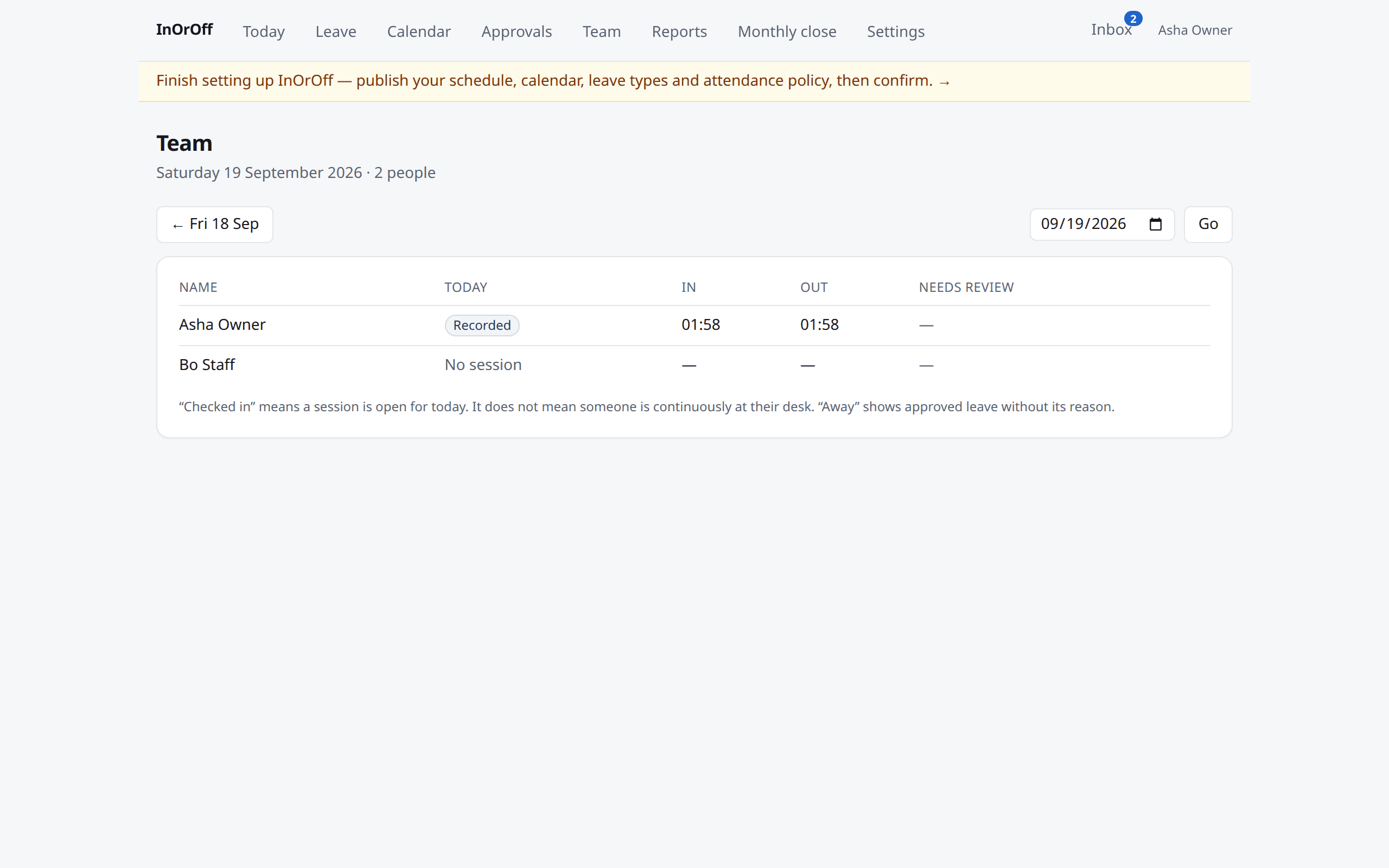
- Team view by day
- Who checked in, who is away, who has an unresolved day, for today or any past day.
- Who is away
- A calendar of absences across the team. It shows that someone is away, never why.
- Reassignment and cover
- When someone leaves or changes manager, waiting approvals are re-routed, with an audit line. If nobody is assigned, an organisation reviewer catches it.
- Nudges
- A daily note when something has waited more than 48 hours, if you want it.
For administrators
Policy is written once, reviewed, published, and explained back to you per person and per date.
- Guided setup
- Six steps derived from your data: schedule, holiday calendar, leave types, attendance policy, people, confirmation. Resume any time; a banner reminds you until you confirm.
- Work schedules
- Per-weekday hours, breaks, overnight shifts, named time zones. Published with a worked example: office span, unpaid break, expected work, half day. Daylight-saving changes come out right because durations are computed from real instants.
- Holiday calendars
- Your country's public holidays are there from day one, and any country, region and year can be previewed and adopted date by date. Per location, published per year, with a warning when next year is missing and an impact preview before a change.
- Leave types by country
- Your country’s statutory and common leave types are there from day one, with the legal basis on each line; preview any other country’s set and add what applies. Every type is editable and archivable.
- Leave types and rules
- Units, allowance models, paid or unpaid, monthly accrual, annual grant with joining-year proration, carry-forward with expiry, probation and notice rules, maximum consecutive days, warnings versus hard stops, authorised overrides with a reason.
- Attendance policy
- Office-network requirement with a "test this network" check before you switch it on, grace for lateness, administrative close time, maximum open session, correction window.
- People
- Directory with search and departments; employment episodes and rehire; effective-dated reporting lines that refuse loops; offboarding that revokes access, re-routes approvals and surfaces open sessions instead of inventing a checkout.
- CSV import
- A dry run first, then apply. Running the same file again changes nothing.
- Why this policy applies
- For any person on any date: which schedule, calendar, policy and approver apply, and where each came from (assignment, location default, organisation).
- Change impact before you commit
- Moving someone to another schedule shows the attendance days re-projected, leave lines touched and finalised months affected; a change into a finalised month is refused.
- New-year readiness
- A checklist (calendars per location, schedules on 1 January, carry rules, forgotten drafts, open periods) and a rehearsal that runs the real rollover and rolls it back.
- Invitations
- Seven-day, single-use invitations you can resend or revoke; last-owner protection; ownership transfer; several organisations and locations in one workspace.
Attendance rules you can rely on
- Server time only
- Every punch is stamped by the server. Forwarded headers from a browser are discarded at the edge.
- One open session per person
- Enforced in the database, so a double check-in cannot happen even in a race.
- Administrative close is not a checkout
- A forgotten checkout is closed at the deadline as an administrative closure. The record says exactly that; no departure time or worked total is invented. Overnight shifts get their own deadline.
- Unknown stays unknown
- A day without a known end exports as UNKNOWN. It is never zero and never the scheduled end.
- Corrections supersede, never overwrite
- An approved correction is a new event that points at the one it replaces. The original stays.
- Six dimensions per day
- Scheduled, observed, reviewed, leave, timeliness and unresolved state are kept apart, so a report can say which is which.
- Work during leave is flagged
- A punch on an approved leave day becomes an exception for review, not a silent overwrite of either record.
- Retries are safe
- A punch retried after a timeout is recognised and not recorded twice.
Monthly close and reports
- Readiness first
- The close page names what still needs attention: corrections waiting, unresolved days, open reviews.
- Versioned finalisation
- Finalising freezes a numbered snapshot with a content hash. Later corrections create a new version; the old one stays downloadable.
- Payroll handoff as CSV and PDF
- Integer minutes, UNKNOWN where the truth is unknown, provenance columns, spreadsheet-injection safe. The PDF is rendered from the persisted CSV of that version, never from live data.
- Adjustments after close
- Recorded against the period with a reason, producing a revised version rather than editing history.
- Reports
- Daily team attendance for any day, monthly attendance per employee, leave balances and transactions, upcoming leave, missing-punch exceptions, approved corrections. Downloads re-check your current role every time.
Security and privacy
- Isolation in the database
- Row-level security is switched on and forced for every tenant table; the application role cannot bypass it. A guessed id from another employer returns "not found", never a count.
- Two-factor and step-up
- Authenticator-app two-factor; privileged changes (publishing policy, finalising, exports, support access, linking a sign-in method) ask you to prove it is you again in the current session.
- No silent account linking
- A Google account with the same email never attaches itself to an existing account. Linking is explicit, by the signed-in owner, after step-up. No Google tokens are stored.
- Hardened sign-in
- Rate limits per address; identical answers for a wrong password and an unknown email; single-use reset links.
- Audit history
- Decisions, corrections, policy changes, exports, downloads and support access carry who, when and a redacted summary. Application roles cannot edit audit rows. Searchable and exportable.
- Support access on your terms
- If you want us to look at your records, your administrator grants a named operator read-only access for at most 72 hours, revocable, and every view is written to your audit history.
- No surveillance
- No photos, biometrics, keystrokes or tracking between check-ins. Optional site coordinates let a phone check-in record one word — at the site or away from it — and the coordinates themselves are never stored.
Files and your data
- Private attachments
- PDF, JPEG or PNG evidence on a leave request, 5 MB each, up to three. Stored privately under generated names, quarantined until a malware scan says clean, readable by the subject and HR reviewers only.
- Full export any time
- One bundle of every table your organisation entered and everything computed for it, behind step-up, audited.
- Retention you control
- Separate retention for network evidence, export files and audit history, with a legal hold that stops every automatic removal.
- Deletion with a grace period
- Ask for deletion and it happens after 30 days unless you cancel. The fact of the deletion is kept so a restored copy is deleted again.
- Delivery you can see
- Every email we send is listed with its outcome; a failed one can be resent.
Plans and billing
- Two flat plans and a trial
- Trial for 90 days, Team up to 50, Business up to 250 active employees, billed yearly. Every feature in every plan.
- Fair limits
- People are counted across all your organisations; invited and archived people do not count. At the limit, new activations wait; nothing that exists is blocked.
- Humane failure
- A missed payment gets notices and 14 days of grace. After that the workspace is restricted: exports, billing and your account stay open, nothing is deleted.
- Billing page
- Plan, usage, state and dates, and a plain explanation of what restricted mode means.
Not yet
Said here so you do not have to ask.
- Card checkout
- Plans are activated by invoice today. Hosted card checkout follows once the merchant country is settled.
- Off-host backup copies
- Verified database checkpoints are taken before every release and restores are rehearsed on this host; copies to another site are on the roadmap.
- External uptime monitor
- Health endpoints exist and are checked by the release process; independent external monitoring is being set up.